Debugging AKS Networking Issues: Ingress, DNS, and TLS Troubleshooting (Part 2)
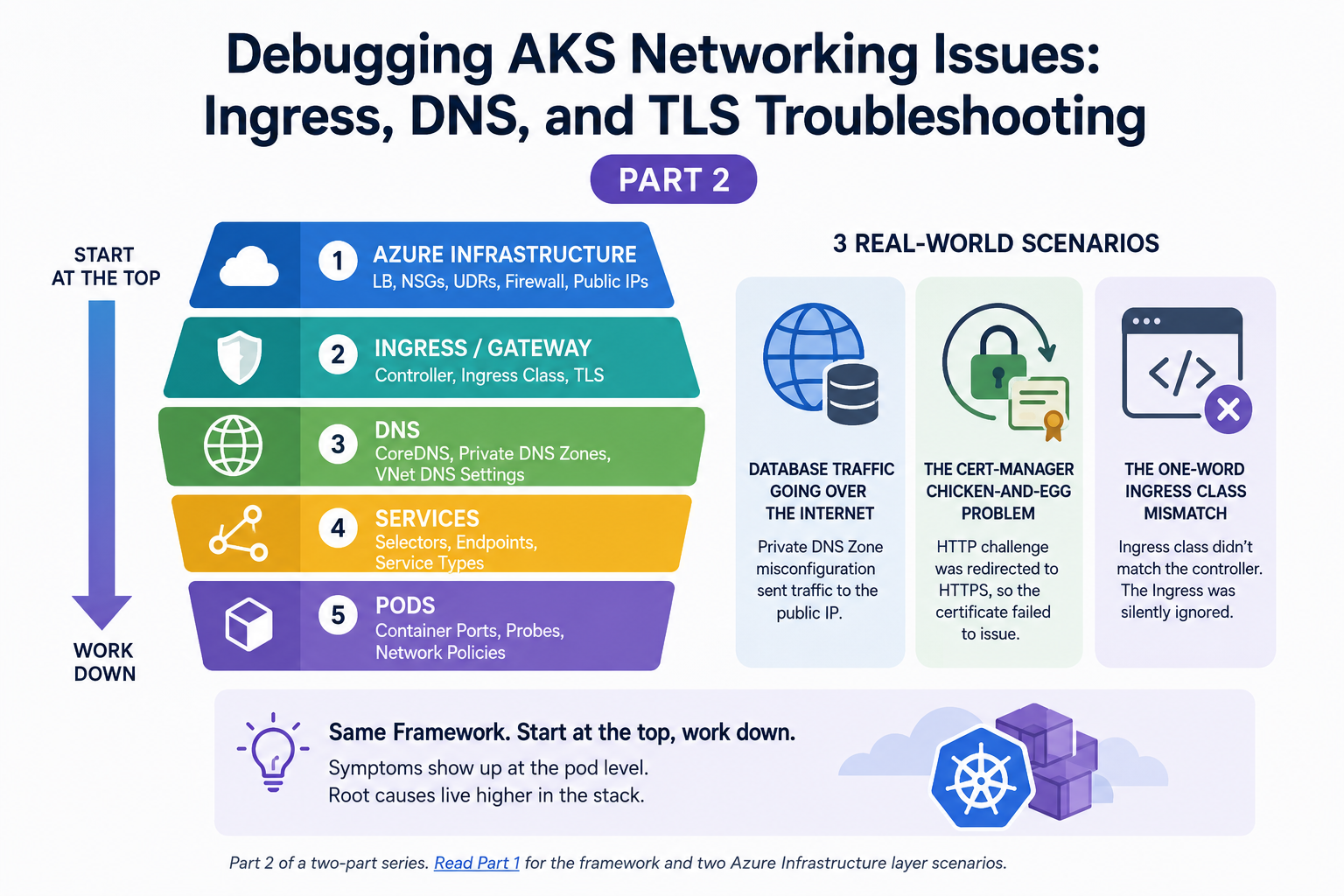
In Part 1, we covered the top-down debugging framework and tackled two scenarios at the Azure Infrastructure layer, namely SNAT port exhaustion and Azure Firewall silently dropping traffic. Both times, the symptoms appeared at the pod level, but the root cause was in the Azure infrastructure that Kubernetes couldn't see.
In this article, we're moving down the stack. We'll work through three more production scenarios: a Private DNS Zone misconfiguration that sent database traffic over the internet, a cert-manager chicken-and-egg problem that broke HTTPS, and an ingress class mismatch that's embarrassingly simple but surprisingly common. Then we'll wrap up with the toolkit and prevention practices I rely on to catch these issues before they become outages.
Same framework. Start at the top, work down.
Scenario 3: Database Traffic Going Over the Internet
What happened
We had an AKS cluster that connected to an Azure database over a private endpoint. The whole point of the private endpoint was to keep database traffic on Microsoft's backbone, never touching the public internet. It had been working fine for weeks.
Then we tightened security and disabled public access to the database. Immediately, the application couldn't connect. Pods were throwing connection timeouts when trying to reach the database.
The misleading clue
On the surface, this looked like a firewall or NSG problem. We had just disabled public access, so the assumption was that something in our network configuration wasn't allowing traffic through the private endpoint.
We checked NSGs on the AKS subnet. We verified that the private endpoint existed and had an IP address in the correct subnet. We confirmed the pod could resolve the database hostname. That last check is where we should have looked more carefully.
The actual problem
The database hostname was resolving, but to the public IP address rather than the private endpoint IP.
When you create a private endpoint for an Azure service, you need a Private DNS Zone (like privatelink.database.windows.net) linked to your VNet. This zone contains an A record that maps the database's hostname to its private IP. Without it, or if the zone isn't linked properly, DNS resolution falls back to the public IP.
When public access was enabled, this didn't matter. The connection worked either way, just over the internet instead of the private link. The moment we disabled public access, the public IP stopped accepting connections, and everything broke.
The Private DNS Zone existed, but it wasn't linked to the VNet that the AKS cluster was in. The zone had been created during initial setup, but the VNet link had either been missed or removed during a Terraform change.
How we found it
Running nslookup from inside a pod told the whole story:
kubectl exec -it <pod-name> -- nslookup mydb.database.windows.netIf this returns a public IP (something outside your VNet CIDR), the Private DNS Zone isn't working. When configured correctly, it should return the private endpoint IP (something like 10.0.5.4 from your private endpoints subnet.)
You can verify the DNS zone linkage from the Azure side:
# Check if the Private DNS Zone exists
az network private-dns zone list \
  --resource-group <your-rg> \
  --output table

# Check VNet links — this is usually where it breaks
az network private-dns link vnet list \
  --resource-group <your-rg> \
  --zone-name "privatelink.database.windows.net" \
  --output table

# Verify the A record points to the private endpoint IP
az network private-dns record-set a list \
  --resource-group <your-rg> \
  --zone-name "privatelink.database.windows.net" \
  --output table
How we fixed it
We linked the Private DNS Zone to the AKS VNet:
az network private-dns link vnet create \
  --resource-group <your-rg> \
  --zone-name "privatelink.database.windows.net" \
  --name "aks-vnet-link" \
  --virtual-network <aks-vnet-id> \
  --registration-enabled false
Within minutes, DNS resolution inside the pods flipped to the private IP and the database connection was restored, all through the private endpoint, no public internet involved.
The lesson
Private endpoints don't work without Private DNS Zones, and Private DNS Zones don't work without VNet links. The dangerous part is that everything appears to work when public access is enabled. You think you're going over the private link, but you're actually going over the internet. You only discover the misconfiguration when you tighten security and disable public access.
The debugging shortcut: whenever a pod can't reach an Azure PaaS service over a private endpoint, run nslookupfirst to check whether the IP is private or public. That single command tells you whether the problem is DNS or something else entirely.
Scenario 4: The Cert-Manager Chicken-and-Egg Problem
What happened
We deployed a new application behind an NGINX Ingress Controller with TLS. The setup was standard: cert-manager with Let's Encrypt to automatically issue and renew certificates, and an ingress resource with the tls block referencing a secret that cert-manager would populate.
After deploying, the application was unreachable over HTTPS. Browsers showed certificate errors. HTTP wasn't working either.
The trap
We had this annotation on the ingress resource:
annotations:
  nginx.ingress.kubernetes.io/ssl-redirect: "true"
This tells NGINX to redirect all HTTP (port 80) requests to HTTPS (port 443). Sounds reasonable, right? You always want to force HTTPS in production.
The problem is that cert-manager uses HTTP-01 challenges to verify domain ownership. Let's Encrypt sends an HTTP request to http://yourdomain.com/.well-known/acme-challenge/<token> on port 80. If that request gets redirected to HTTPS, which doesn't have a valid certificate yet, the challenge fails. And if the challenge fails, cert-manager can't issue the certificate.
So we were stuck in a loop: HTTPS didn't work because there was no certificate. There was no certificate because cert-manager couldn't complete the challenge. The challenge couldn't complete because all HTTP traffic was being redirected to HTTPS.
How we found it
First, we checked the certificate status:
kubectl get certificates -A
kubectl describe certificate <cert-name> -n <namespace>
The certificate was stuck in a False ready state. The events showed that the ACME challenge was failing.
Then we checked the cert-manager logs:
kubectl logs -n cert-manager deployment/cert-manager -fThe logs showed HTTP-01 challenge failures; Let's Encrypt couldn't reach the challenge endpoint.
How we fixed it
The fix was to add an annotation that tells NGINX not to redirect the ACME challenge path:
apiVersion: networking.k8s.io/v1
kind: Ingress
metadata:
  annotations:
    nginx.ingress.kubernetes.io/ssl-redirect: "true"
    cert-manager.io/cluster-issuer: "letsencrypt-prod"
spec:
  tls:
  - hosts:
    - app.example.com
    secretName: app-tls-secret
  rules:
  - host: app.example.com
    http:
      paths:
      - path: /
        pathType: Prefix
        backend:
          service:
            name: app-service
            port:
              number: 80
Cert-manager's ingress shim actually handles this by creating a temporary ingress specifically for the challenge that bypasses the redirect. But in our case, the solver wasn't configured correctly. Once we verified the ClusterIssuer had the right solvers configuration with the correct ingress class, cert-manager created the challenge ingress, Let's Encrypt validated the domain over HTTP, the certificate was issued, and HTTPS started working.
The whole loop resolved itself within a few minutes.
The lesson
When you combine ssl-redirect: "true" with cert-manager's HTTP-01 challenges, you need to make sure the challenge path can still be reached over plain HTTP. This is one of those issues that only bites you on first deployment or certificate renewal; it works fine in between, which makes it hard to catch in testing.
The debugging shortcut: if a certificate is stuck in a not-ready state, check the cert-manager logs for challenge failures before touching anything else. Nine times out of ten, the challenge endpoint is unreachable.
Scenario 5: The One-Word Ingress Class Mismatch
What happened
We deployed an application with an ingress resource, but no traffic was reaching it. The NGINX Ingress Controller was running. The Service and Endpoints were correct. The pods were healthy. But hitting the URL returned nothing — no 404, no 502, just a connection timeout.
The actual problem
The ingress controller was configured with the class nginx. Our ingress resource specified the class nginx-ingress.
# What the controller was using
spec:
  ingressClassName: nginx

# What our YAML had
spec:
  ingressClassName: nginx-ingress
That's it. One word. The ingress controller simply ignored our ingress resource because the class didn't match. No error, no warning in the controller logs, no event on the ingress object, it just silently skipped it.
How we found it
We checked what the ingress controller was actually watching:
# See what IngressClasses exist in the cluster
kubectl get ingressclass

# Check what class the controller is configured for
kubectl describe ingressclass nginx
Then compared it to our ingress resource:
kubectl get ingress <ingress-name> -o yaml | grep ingressClassNameThe mismatch was immediately obvious once we looked at both side by side.
How we fixed it
We corrected the ingressClassName In our ingress YAML to match what the controller expected:
spec:
  ingressClassName: nginx  # not nginx-ingress
Applied the change, and traffic started flowing within seconds.
The lesson
This is a five-second fix, but it can waste an hour if you're not looking for it. The NGINX Ingress Controller doesn't complain when no ingress resources match its class; it just has nothing to serve. The debugging shortcut: when traffic isn't reaching your ingress, the first thing to check is kubectl get ingressclass and compare it to your ingress resource's ingressClassName. Do this before checking any other layer.
The Toolkit
Throughout both articles, I've referenced various commands. Here's the consolidated toolkit organized by the top-down framework layers.
Layer 1: Azure Infrastructure
# Load Balancer SNAT port usage
az network lb show --resource-group <rg> --name <lb> --query "outboundRules"
az monitor metrics list --resource <lb-resource-id> --metric "SnatConnectionCount"

# NSG rules on AKS subnet
az network nsg rule list --resource-group <rg> --nsg-name <nsg> --output table

# UDR / Route Table
az network route-table route list --resource-group <rg> --route-table-name <rt> --output table

# Azure Firewall logs (denied traffic)
# Use Log Analytics query: AzureDiagnostics | where Category == "AzureFirewallApplicationRule" | where msg_s contains "Deny"
Layer 2: Ingress / TLS
# Ingress class check
kubectl get ingressclass
kubectl get ingress <name> -o yaml | grep ingressClassName

# Ingress controller logs
kubectl logs -n ingress-nginx deployment/ingress-nginx-controller -f

# TLS certificate status
kubectl get certificates -A
kubectl describe certificate <name> -n <namespace>

# Verify certificate from outside
openssl s_client -connect app.example.com:443 -servername app.example.com

# Cert-manager logs
kubectl logs -n cert-manager deployment/cert-manager -f
Layer 3: DNS
# Resolve from inside a pod
kubectl exec -it <pod> -- nslookup <hostname>
kubectl exec -it <pod> -- nslookup kubernetes.default.svc.cluster.local

# CoreDNS health
kubectl get pods -n kube-system -l k8s-app=kube-dns
kubectl logs -n kube-system -l k8s-app=kube-dns

# Private DNS Zone verification
az network private-dns link vnet list --resource-group <rg> --zone-name <zone> --output table
az network private-dns record-set a list --resource-group <rg> --zone-name <zone> --output table
Layer 4: Services and Pods
# Service endpoints (are pods registered?)
kubectl get endpoints <service-name>

# Test connectivity from inside a pod
kubectl exec -it <pod> -- curl -v <service-url>
kubectl debug node/<node-name> -it --image=nicolaka/netshoot

# Network policies
kubectl get networkpolicies -A
Prevention: Catching These Before Production
The best debugging is the debugging you never have to do. Here's what I put in place after learning these lessons the hard way.
Monitor SNAT ports. Set up Azure Monitor alerts on the Load Balancer's SNAT connection count. Alert at 80% utilization, so you have time to add public IPs or optimize connection pooling before exhaustion hits.
Validate Private DNS Zones in Terraform. Every time you create a private endpoint, your Terraform module should also create the DNS zone record and VNet link in the same resource block. Don't leave DNS as a manual step.
Test firewall rules during provisioning. After standing up a cluster with UDR routing, run a connectivity test as part of your deployment pipeline. A simple curl to your known external dependencies from inside a pod will catch missing firewall rules before they hit production.
Standardize ingress class names. Pick one ingress class name and enforce it across all your clusters. Document it. Add a validation step in your CI pipeline that checks ingress resources for the correct ingressClassName before they deploy.
Build a pre-flight networking checklist. Before any new application goes to production, run through: Can the pod resolve external hostnames to the right IPs? Can the pod reach its database over the private endpoint? Is the Ingress Controller picking up the Ingress resource? Is the TLS certificate issued and valid? Five minutes of checks saves hours of 2 am debugging.
Wrapping Up
Across both articles, every scenario followed the same pattern: symptoms appeared at the pod level, the instinct was to debug at the pod level, and the root cause lay higher in the stack.
The top-down framework works because AKS networking is two systems stitched together. Azure infrastructure problems masquerade as Kubernetes problems. The most senior debugging skill isn't knowing more kubectl commands, it's knowing when to stop looking at Kubernetes and start looking at Azure.
Here's the framework one more time:
Azure Infrastructure — Load Balancer, NSGs, UDRs, Firewall, Public IPs
Ingress / Gateway — Controller config, ingress class, TLS certificates
DNS — CoreDNS, Private DNS Zones, VNet DNS settings
Services — Selectors, Endpoints, Service types
Pods — Container ports, probes, Network Policies
Start at the top. Work down. You'll find the problem faster.
This is Part 2 of a two-part series. Read Part 1 for the full framework and two Azure Infrastructure layer scenarios (SNAT exhaustion and Azure Firewall routing).
What's the sneakiest AKS networking issue you've run into? I'm always collecting war stories. Reach out on LinkedIn or drop a comment below.